

How to create a book events on ATReads

A "book event" typically refers to a gathering, occasion, or happening centered around books and literature. These events can take various forms, catering to different aspects of the literary world.
Creating a book event on ATReads is a straightforward process.
Here's a step-by-step guide to help you set up an event:
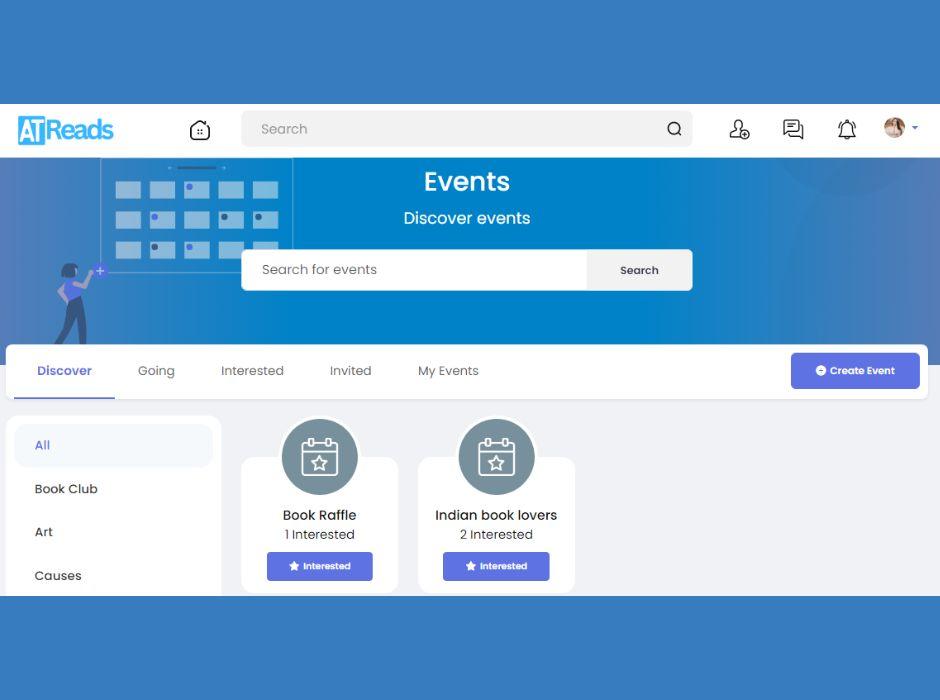
1. Log In to ATReads: Start by logging into your ATReads account. If you don't have an account, you'll need to create one.
2. Navigate to the Events Tab: Once logged in, go to the homepage or your profile. On the left-hand side, you'll find a menu. Look for the "Events" tab, which may be under the "Explore" section.
3. Create an Event: Click on the "Events" tab, and then click on the "Create Event" button.
4. Event Details:
- Event Name: Enter a name for your event.
- Location: Add the location where the event will take place. If it's an online event, you can select "Online" as the location.
- Date and Time: Choose the date and time for your event.
- Description: Provide a brief description of your event, including key details and any necessary information for attendees.
- Category: Choose a category that best fits your event (e.g., book club,Concert, Party, Networking).
5. Privacy Settings:
- Public: Anyone on or off ATReads can see the event, and anyone invited can join.
- Friends: Only people you invite can see and join the event.
- Only Me: Only you can see and join the event.
6. Additional Settings:
- Co-hosts: If you're organizing the event with others, you can add co-hosts.
- Guest List: Choose whether guests can invite others and add friends to the guest list.
7. Add a Cover Photo: Upload an eye-catching cover photo for your event. This helps make your event visually appealing and provides attendees with a quick glimpse of what to expect.
8. Create: Click on the "Create" button once you've filled in all the necessary details.
9. Invite Guests: After creating the event, you'll be prompted to invite people. You can search for friends, select specific friends, or invite everyone in your friend list. You can also share the event on your timeline.
10. Manage Your Event: Once your event is live, you can manage it from the event page. You can post updates, interact with attendees, and make any necessary changes.
11. Promote Your Event: Use the "Share" button to promote your event on your timeline, in groups, or on pages. You can also share the event link via other social media platforms or through direct messages.
Creating books event on ATReads is a great way to gather people for various occasions, whether it's a birthday party, a business meetup, or a virtual gathering. Customize your event to suit your needs and engage with attendees to make the most of your ATReads event experience.


- Book Reviews & Literary Discussions
- Writing
- Reading List
- Arts and Entertainment
- Personal Development
- Storytelling
- Startup
- Books
- Biography
- Dance
- Drinks
- Entertainment & Pop Culture
- Health & Fitness
- Education & Learning
- Food & Cooking
- Jogos
- Gardening
- Self-Care & Mental Health
- Home Decor & DIY
- Literature
- Music
- Networking
- Outro
- Party
- Philosophy and Religion
- Local
- Shopping
- Relationships & Dating
- Sports
- Theater
- lifestyles & hobbies/shutterbugs
- Lifelong Learning
- Tutorial
- Announcement
- Inspirational Stories & Motivation

 English
 Arabic
 French
 Spanish
 Deutsch
 Turkish
 Dutch
Dutch
 Italiano
 Russian
 Romaian
 Portuguese (Brazil)
 Greek
Greek
